

Overview
Shopflo Checkout is a seamless, optimized checkout solution designed to enhance the shopping experience by simplifying the checkout process. It offers a user-friendly interface, reducing friction during the final stages of the purchase journey, and supports various payment methods and customization options. Integrating Shopflo with iCart Cart Drawer Cart Upsell enhances the customer's shopping experience by providing a smooth and efficient checkout within the cart drawer itself.
Enable Shopflo Checkout in iCart
Enable Shopflo Checkout in iCart
Before you can select the "Shopflo checkout" option in the iCart app, you need to provide us your API Token from your Shopflo account. Without this step, the "Shopflo checkout" option will not appear.
Steps to Retrieve API Token from Shopflo:
To get the API token from your Shopflo account, follow the steps in the guide linked below:
How to Create a New Channel and Retrieve API Token from Shopflo
Once you've generated the API Token, please contact our support team via Live Chat or email us at [email protected]. Provide the token to the team, and we will add it to the app on your behalf, enabling the "Shopflo checkout" option in iCart Cart Drawer Cart Upsell.
Steps to Select Shopflo Checkout Option
To configure iCart Cart Drawer Cart Upsell with Shopflo checkout, follow the steps below:
- Login to your Shopify account.
- Click on the "Apps" menu to access the list of installed apps.
- Select the "iCart Cart Drawer Cart Upsell" app from the list.
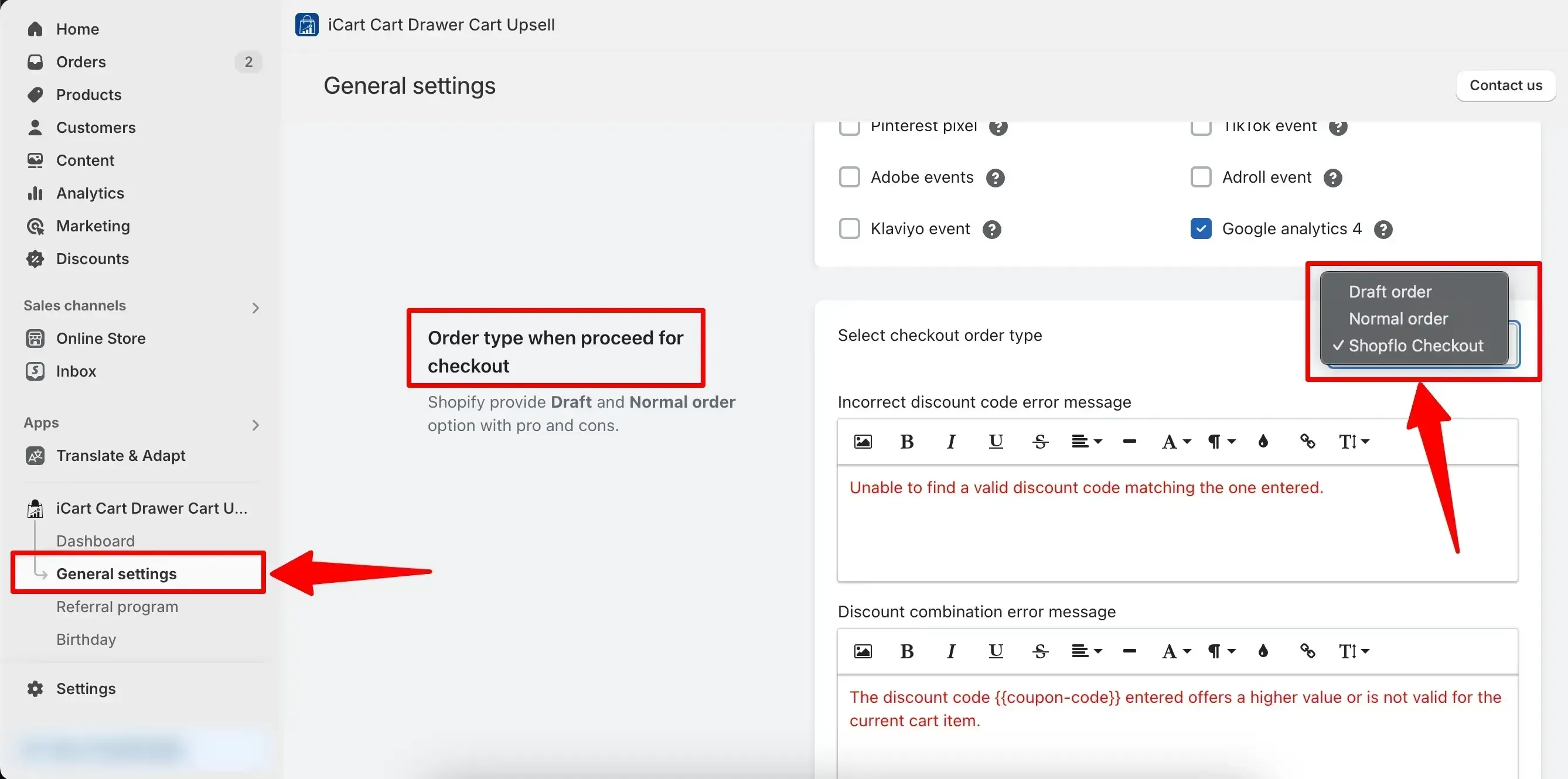
- Navigate to the "General Settings" menu under the iCart app name.
- Scroll down on the settings page and locate the "Order type when proceed for checkout" option.
- From the dropdown list, select "Shopflo checkout" and click Save to confirm the setting.
If you've followed the steps above but are still unable to use Shopflo checkout with iCart, please reach out to our support team for further assistance.