


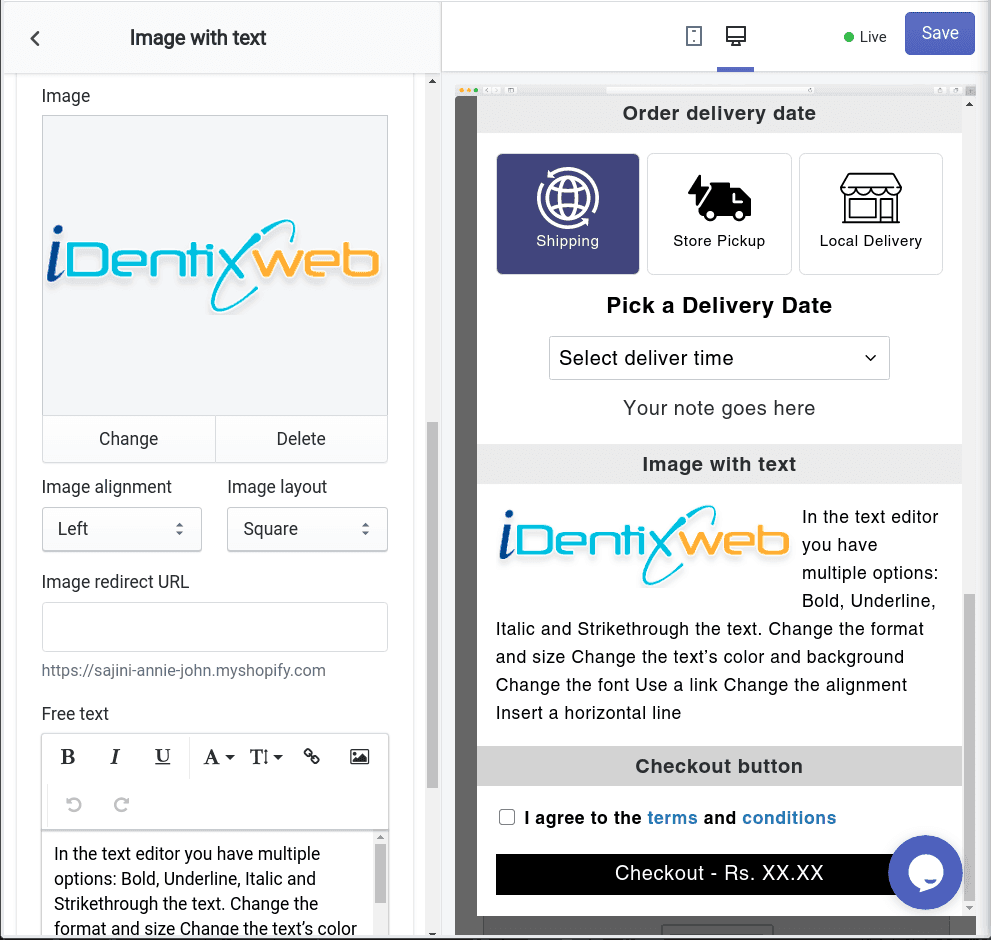
The Image with Text widget lets you display custom images along with text inside your cart. It's a great way to show announcements, ongoing offers, shipping updates, policy reminders, or even redirect customers to specific pages — all while keeping the experience visually engaging and informative.
Let’s explore each setting available in this widget:
🏷️ Widget Heading
The widget heading helps you identify and manage widgets within the iCart editor. It won't be visible to customers but is helpful for internal organization when using multiple widgets.
Learn more about widget headings →
🖼️ Title
This is the visible heading shown at the top of the widget in your cart drawer. You can show or hide the title, change its background color, or customize the text color to match your brand style.
Learn more about title settings →
📷 Image
Choose the image you want to display in the widget — this could be a promotional banner, seasonal offer, or trust badge. You can also adjust the alignment of the image to be left, center, or right based on your layout preference.
🔗 Image Redirect URL
Add a clickable link to the image. When customers click the image, they’ll be redirected to the URL you set — for example, a sale collection, FAQ page, or product page.
✏️ Free Text
Use this field to add a short message or explanation below the image. For example:
- “Offer valid till midnight!”
- “Tap the image to view our return policy.”
- “Get 10% off with code WELCOME10.”
The text will be displayed alongside or beneath the image, depending on your image alignment.
🧩 Rules
You can control where, when, and for whom this widget appears using rules. For example, display it only:
- On specific URLs
- If the cart contains certain items
- Based on customer tags or device types
Learn more about display rules →
🗑️ Delete
If you no longer need the widget, you can remove it by clicking the Delete option at the bottom of the widget settings in the editor.
💬 Need Help?
If you have any questions or need assistance with setting up the Image with Text widget, feel free to email us or live chat with our support team — we’re always here to assist you!
Know more about this widget in Image with Text Widget guide.