


If you want to show a threshold in the Progress Bar without actually applying the discount, you can easily do that using the iCart app. This is helpful when you want to inform customers about an available manual or automatic discount set up in your Shopify admin, without applying it automatically at checkout.
You’ve set up a discount code in Shopify and want to highlight the offer in the progress bar, but prefer customers enter the code manually — or you want to avoid applying the discount automatically from the cart.
➞ Show the text without applying discount
- Go to the Discount tier inside the cart editor (Quick cart or Full cart) > Progress bar
- Click on Other Option
- Under Select discount, choose No discount
- In the next step, add your offer-related content (text you want to show)
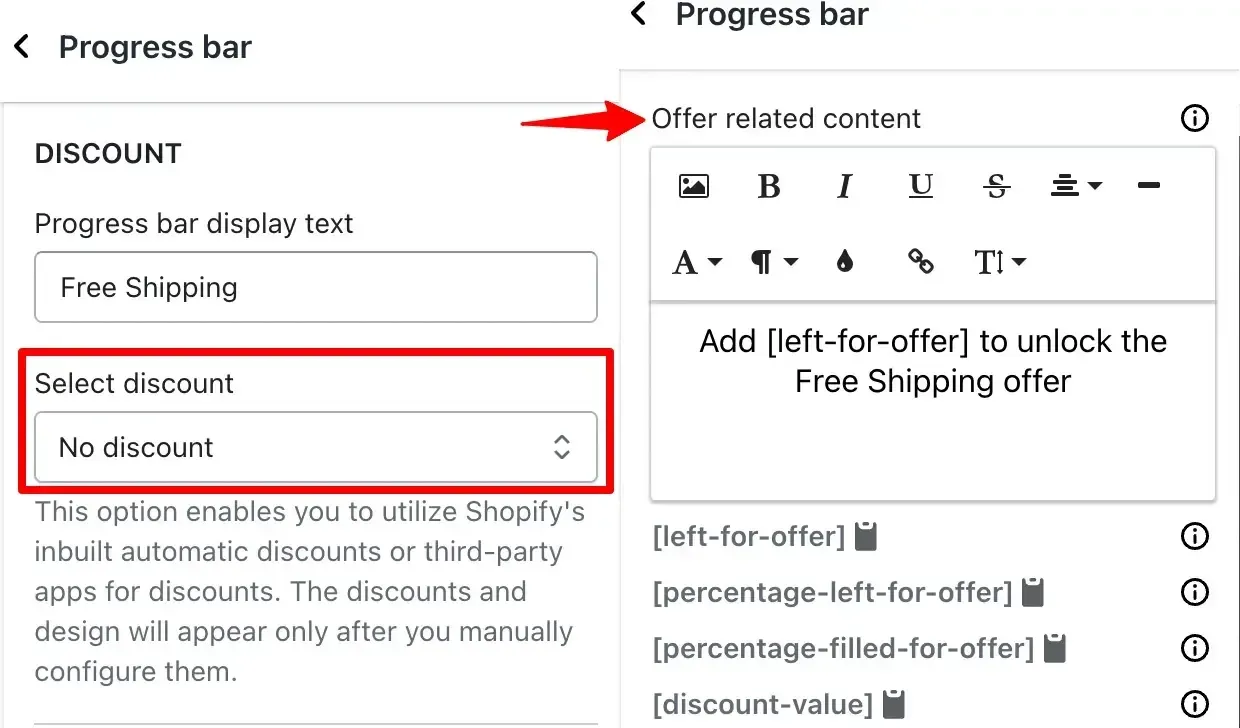
This setup ensures the text for the offer appears in the progress bar, but no discount is applied automatically through cart.
Need Help?
If you face any issues or have any questions regarding the app, don’t hesitate to drop a message in live chat or email us. We’re here to assist you every possible solutions!
👉 You can also refer to our Progress Bar Setup Guide for more detailed instructions.