


Overview
In iCart, you can choose the type of checkout order your store will use — either Draft Order or Normal Order. Each order type has its own benefits and limitations depending on the Shopify features you want to use.
This setting affects how discounts, shipping, and upsell features behave at checkout, so it's important to choose the option that best fits your business needs.
⚙️ How to access this setting
To select your preferred checkout order type, follow these steps:
- Go to your iCart app dashboard.
- Navigate to General Settings.
- Scroll to the section “Order type when proceed for checkout.”
- Use the dropdown to choose between Draft order or Normal order.
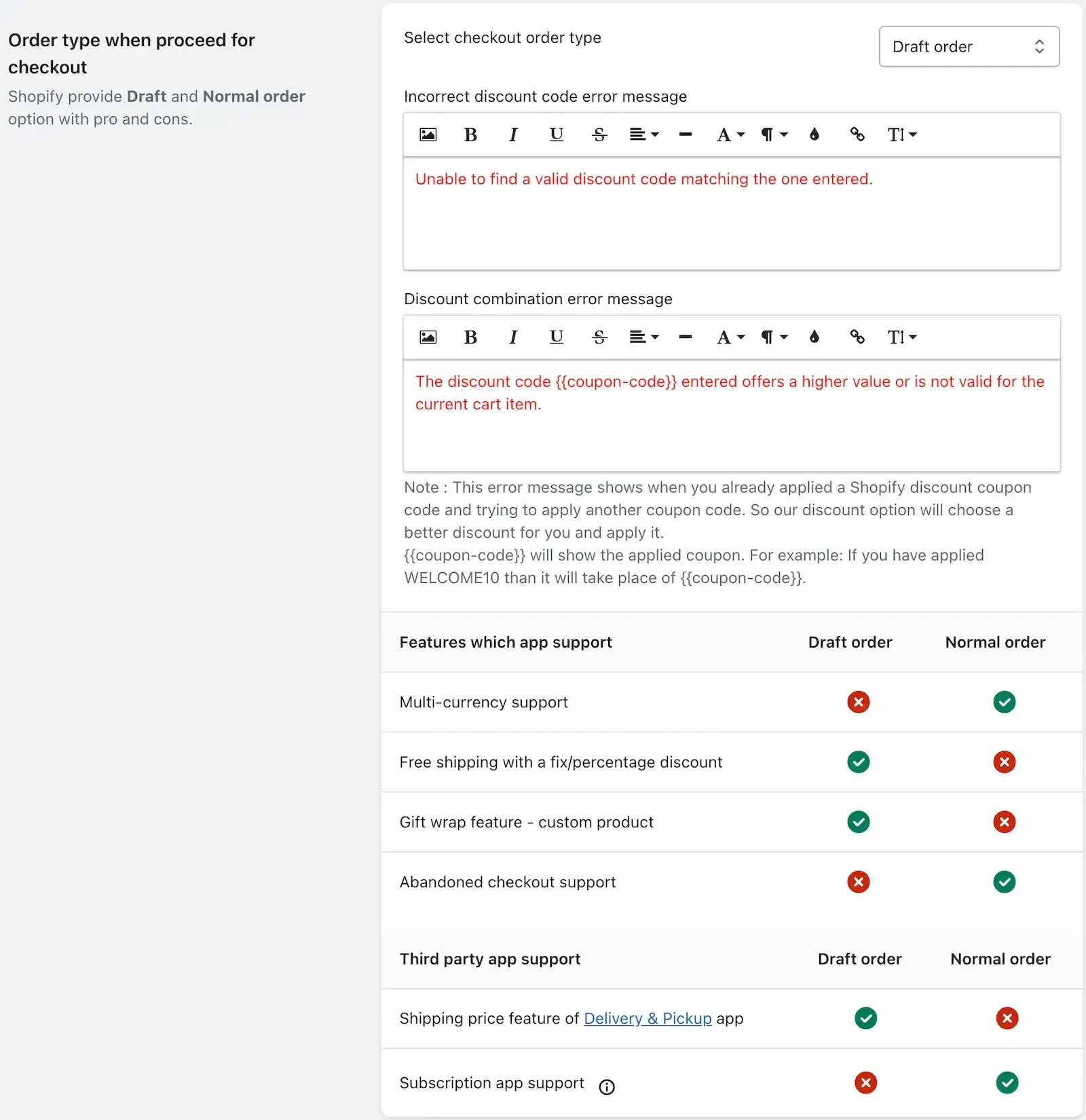
You’ll also see additional settings for:
- Enabling free shipping coupon combination
- Customizing error messages for invalid or overlapping discount codes
📊 Comparison: Draft order vs. Normal order
| Feature / Support | Draft Order ✅ | Normal Order ✅ |
|---|---|---|
| Multi-currency support | ❌ | ✅ |
| Free shipping with fixed/percentage discount | ✅ | ❌ |
| Gift wrap (custom product upsell) | ✅ | ❌ |
| Abandoned checkout support | ❌ | ✅ |
| Supports Delivery & Pickup app’s shipping | ✅ | ❌ |
| Subscription app support | ❌ | ✅ |
📝 Draft Order – Key points
Choose Draft Order if you want to:
- Allow free shipping discounts in the progress bar and widgets.
- Enable custom product upsells in cart item or checkout button widgets.
- Use Shopify automatic discounts alongside iCart’s discount logic.
- Our app’s discount will still apply if you’ve selected either:
- Apply both discounts, or
- Apply only our app discount (from General Settings → Choose Discount Type)
📄 Normal Order – Key points
Choose Normal Order if you want:
- Full support for multi-currency, abandoned checkout, and subscription apps.
- Discounts to be combined into a single visible coupon code on the checkout page.
However, some limitations apply:
- Free shipping discounts are not supported, and these settings will auto-adjust:
- Progress bar: “Select discount” will become “No discount”
- Other widgets: “Free shipping” will be removed
- Custom product upsells are not available and will be replaced with “Specific product” upsell.
🔁 Discount error message settings
You can customize messages that appear when:
- A discount code is invalid or not found
- A second discount code is attempted but the first one has a higher priority
Use {{coupon-code}} to dynamically insert the discount code in your error message.
📌 Final notes
You can switch between order types anytime, but make sure your settings and upsell features are compatible with the selected order type.
Consider your store’s needs — e.g., international selling, subscriptions, or upselling custom gift items — when deciding which order type to use.
🙋 Need help?
If you're unsure which order type is right for your store, or if you run into any issues, feel free to email us or live chat with our support team — we’re always here to assist you!